Posts

Showing posts with the label Left

LEFT Function in Excel
Image
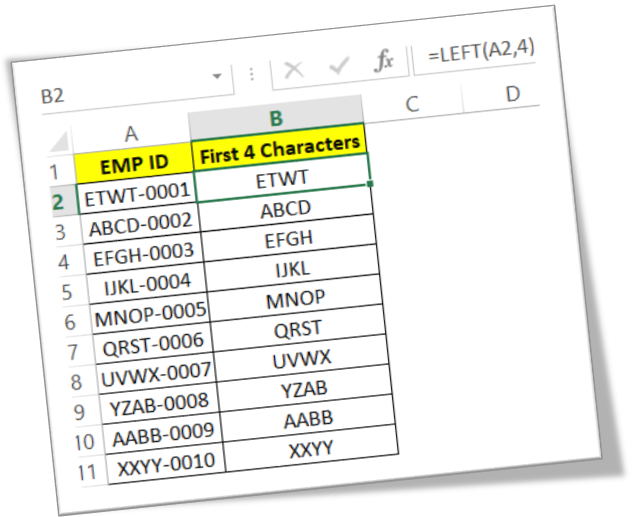
In this blog post we will learn about LEFT function in excel. With the help of this function we can extract number of characters from the beginning of the text string. Where to find LEFT function on Excel Screen: LEFT function can be found under “Text Function” category under “Formula Tab” as shown in below image: Once we click on “Text” category, we can see list of various Text Functions available in excel. LEFT function is highlighted in red in below image. Once we click on LEFT option as highlighted above, we will get the function argument dialog box as shown in below image: Syntax of LEFT Function: The Syntax of LEFT function is as below: =LEFT(text,[num_chars]) Arguments of LEFT Function: To use the LEFT function we have to use 02 arguments: Text : This is mandatory argument. We have to select the text from which we have to extract the number of characters from the beginning of the text string. Num_chars : In this argument, we have to specify the number of characters which we want...

Freeze & Unfreeze Panes in Excel

Image
In this blog post we will learn to Freeze & Unfreeze Panes in excel. Whenever we are working with large volume of data we may need to scroll our screen top-down or left-right to refer the data which is located at top of our sheet or on the left side of our sheet. Scrolling the excel screen will consume lot of time. To tackle this situation excel has provided one excellent feature in which we can freeze the desired rows or columns. This feature is called as “Freeze Panes”. Freeze Pane command we can find in “View” tab under “Window” group as shown in below image. Once we click on “Freeze Panes” command, we can see 03 more options as below: 1. Freeze Panes 2. Freeze Top Row 3. Freeze First Column We will see all these 03 options one by one. Freeze Panes: This option will freeze the rows which are on top and which are on the left side of the selected cell. All the other cells can be scrolled top-down or left-right. This will help us to lock all the rows above and all the columns on th...