TIME Function in Excel
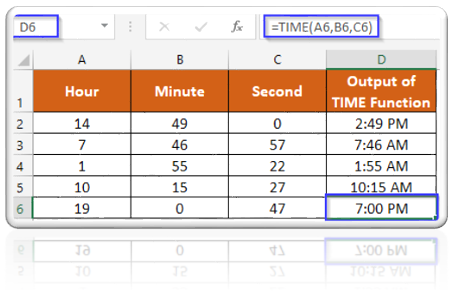
In this blog post we will learn about TIME function in excel. When we have Hour, Minute and Second as a three separate values then with the help of TIME function we can convert them into single value which will represent a particular TIME. Where to find TIME function on Excel Screen: TIME function can be found under “Date & Time Function” category under “Formulas” tab and under “Function Library” group as shown in below image: Once we click on “Date & Time” category, we can see list of various Date & Time Functions available in excel. TIME function is highlighted in blue in below image. Once we click on TIME option as highlighted above, we will get the function argument dialog box as shown in below image: Syntax of TIME Function: The Syntax of TIME function is as below: =TIME(hour, minute, second) Arguments of TIME Function: To use the TIME function, we have to provide three arguments: Hour : In this argument we have to enter a number from 0 to 23 which represents hour from...