Posts

Showing posts with the label Concatenate

Merge data from Duplicate Rows into a Single Cell in Excel.
Image
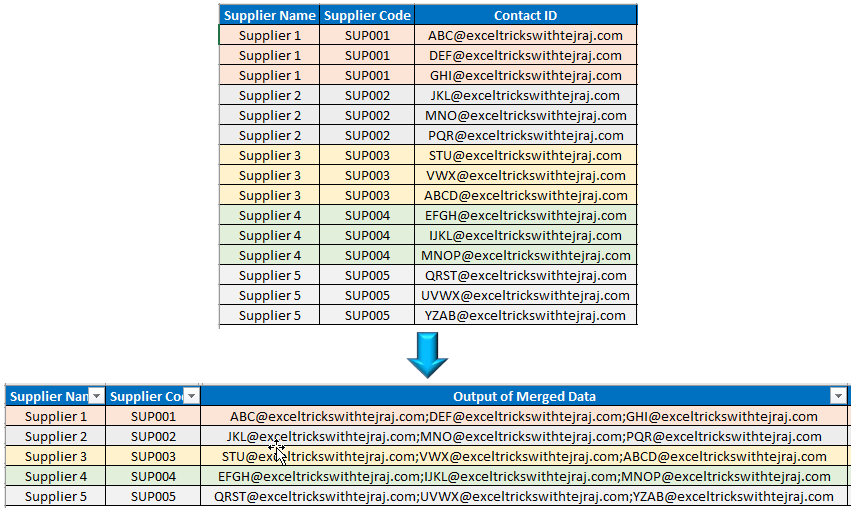
In this blogpost, we will learn to merge data from duplicate rows into a single cell in excel. Many times, we may face a situation where we have duplicate entries in rows,  and we want to merge the data from these duplicate entries into single cell. This post is perfect solution for similar problems. Let us understand this solution with simple example. Let us assume that we have a supplier database in which we have multiple contacts listed for same supplier in multiple rows (as shown in below image). In this database, Supplier 1 with unique supplier code has 03 different Contact IDs listed in 03 different rows and same scenario is with Supplier 2, Supplier 3, Supplier 4 and Supplier 5. Now we want to merge these multiple Contacts IDs for respective supplier in a single cell separated by semicolon (;). To merge data from multiple rows into a single cell in excel, follow below simple steps: Before following the below steps make sure “Supplier Code” column is sorted (Sort Type is...
CONCATENATE Function in Excel

Image
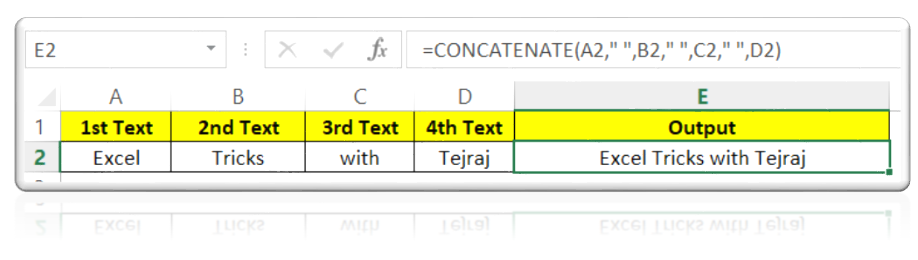
In this blog post we will learn about CONCATENATE function in excel. CONCATENATE function joins several text string into once text string. Where to find CONCATENATE function on Excel Screen: CONCATENATE function can be found under “Text Function” category under “Formula Tab” as shown in below image: Once we click on “Text” category, we can see list of various Text Functions available in excel. CONCATENATE function is highlighted in red in below image. Once we click on CONCATENATE option as highlighted above, we will get the function argument dialog box as shown in below image: Syntax of CONCATENATE Function: The Syntax of CONCATENATE function is as below: =CONCATENATE(text1, [text2],….) Arguments of CONCATENATE Function: To use the CONCATENATE function we have to use below arguments: text1 : This is mandatory argument in which we can provide 1st text string. text2 : This is optional argument in which we can provide 2nd text string. In similar way, we can provide maximum 255 text stings...