Posts

Showing posts with the label UPPER

Convert Text in Proper Case in Excel

Image
In this blog post, we will learn to convert text in “Proper Case” in excel. What is Proper Case? Proper case is somewhat different than “lower case” and “upper case”. In lower case all the letters are in “lower case” whereas in upper case all the letters are in “upper case”. But in Proper Case, first word from each word is in “upper case” and all the other letters are in “lower case”. Converting Text in Proper Case: Now we will learn to convert the text into Proper Case with simple example. For this we prepared dummy data as shown in below image. In the first column we have inserted input text which we will convert into Proper Case in the next Column. For this we will use “PROPER” function which is readily available in excel. First of all select the cell in which we have to convert the input text in Proper Case. In this case we have selected cell “B2”. Now, type “=PROPER(A2)” in cell “B2”. Once we type above function in cell “B2”, we have to just hit enter button on our keyboard. This ...
Converting Text from Uppercase to Lowercase in Excel

Image
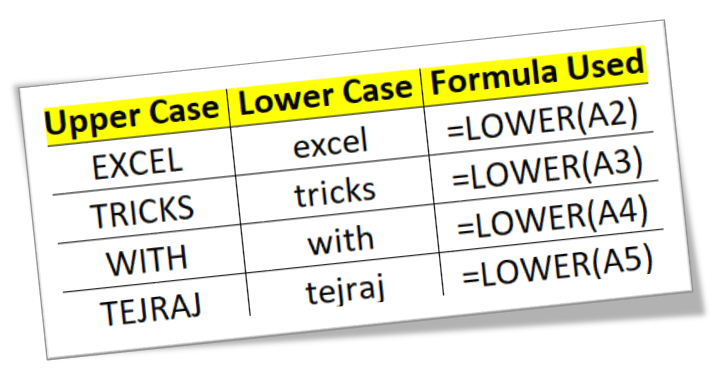
In this blog post we will learn to convert text from upper case to lower case. To convert text from upper case to lower case, we will use “LOWER” function in excel. We will learn this with the help of dummy data as shown in below image. In 1st column we have some text which is in uppercase. In 2nd column, we will use excel function which will help to convert the text from 1st column (which is in UPPER case) into lower case. We have to select the cell in which we want the output in “lower case” (In this case we have selected the 1st cell from 2nd column). Now, type the formula “=LOWER(A2)” in selected cell (Here “A2” is the cell address of 2nd cell from 1st column). After writing the formula, we have to just hit “enter” button on our keyboard. With this we can see the text is now converted in to lower case in selected cell. To convert the text from upper case to lower case in remaining cells, we have to just copy and paste the above formula. In below image you can see the formula which ...

Converting Text from Lowercase to Uppercase in Excel

Image
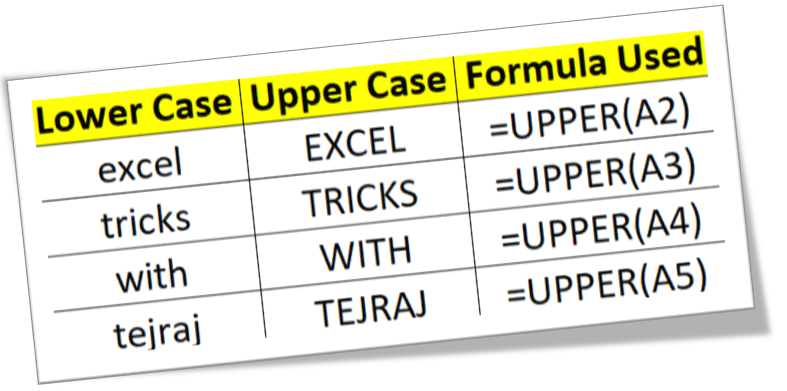
In this blog post we will learn to convert text from lower case to upper case. To convert text from lower case to upper case, we will use “UPPER” function in excel. We will learn this with the help of dummy data as shown in below image. In 1st column we have some text which is in lowercase. In 2nd column, we will use excel function which will help to convert the text from 1st column (which is in lower case) into upper case. We have to select the cell in which we want the output in “upper case” (In this case we have selected the 1st cell from 2nd column). Now, type the formula “=UPPER(A2)” in selected cell (Here “A1” is the cell address of 1st cell from 1st column). After writing the formula, we have to just hit “enter” button on our keyboard. With this we can see the text in now converted in to Upper Case in selected cell. To convert the text from lower case to upper case in remaining cells, we have to just copy and paste the above formula. In below image you can see the formula which ...